Dynamics 365 implementation helps organizations connect people, processes, data, and applications within a unified business platform. When planned effectively, it reduces operational inefficiencies, improves visibility, streamlines decision-making, and creates a foundation for scalable business growth.
Many organizations begin their Dynamics 365 journey because business-critical information is spread across spreadsheets, disconnected applications, email threads, and departmental systems. The goal is not simply to replace legacy software. The objective is to improve business outcomes through better processes, automation, collaboration, and data management.
Before starting any implementation, ask a fundamental question:
What business problems are we solving, and how will we measure success?
Dynamics 365 Implementation at a Glance
What Is Dynamics 365 Implementation?
Dynamics 365 implementation is the process of planning, configuring, integrating, migrating, testing, deploying, and optimizing Microsoft Dynamics 365 applications to support business goals and operational requirements.
What Should Come First?
Organizations should begin with business objectives, process analysis, project scope, stakeholder alignment, and measurable KPIs.
Should Dynamics 365 Be Customized?
Not always. Standard functionality and configuration options should be evaluated before pursuing custom development.
Does Implementation End at Go-Live?
No. Successful organizations continue optimizing processes, monitoring adoption, and improving performance long after deployment.
What Is Dynamics 365 Implementation?
Dynamics 365 implementation is a structured approach to deploying Microsoft Dynamics 365 applications across an organization.
A typical implementation includes:
- Business process assessment
- Requirements gathering
- Solution design
- System configuration
- Data migration
- Application integration
- Testing and validation
- User training
- Go-live deployment
- Continuous optimization
The objective is to improve how work gets done, not simply recreate outdated processes in a new platform.
Dynamics 365 Implementation Process: A Practical 10-Step Blueprint
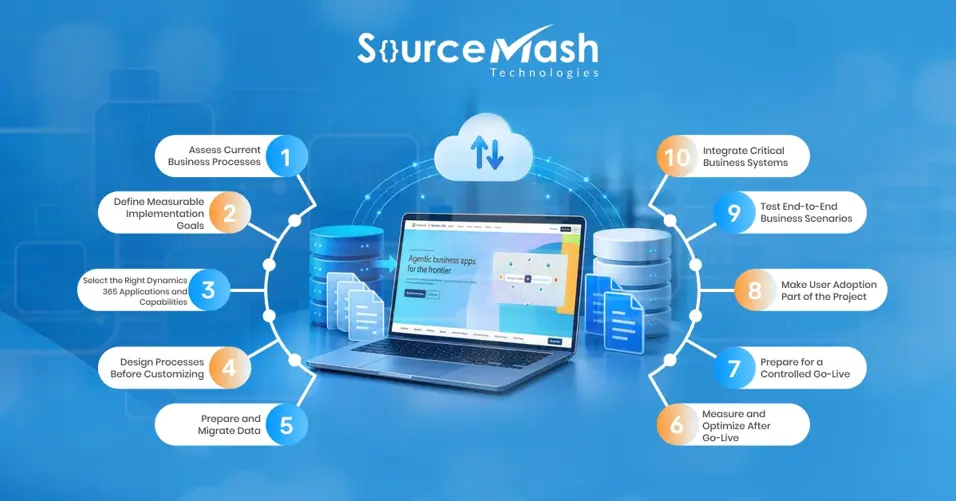
Successful implementations start with clear business outcomes and follow a structured roadmap.
Implementation Roadmap
Assess → Define → Design → Configure → Integrate → Migrate → Test → Train → Deploy → Optimize
Step 1: Assess Current Business Processes
The first step is understanding how work is performed today.
Evaluate areas such as:
- Manual data entry
- Spreadsheet dependency
- Slow approval processes
- Process inconsistencies
- Duplicate effort
- Disconnected systems
- Reporting challenges
Example
Current State: Sales teams manually send order information through emails.
Problem: Delays, missing information, and repeated follow-ups.
Target State: Automated data transfer between sales and operations.
Success Measure: Reduced processing time and fewer data errors.
Understanding current challenges helps create a stronger implementation strategy.
Step 2: Define Measurable Implementation Goals
Many projects fail because success is never clearly defined.
Avoid vague objectives like:
- Improve efficiency
- Increase productivity
- Improve customer satisfaction
Instead, establish measurable KPIs.
Examples of Implementation KPIs
- Reduction in manual tasks
- Lead-to-opportunity conversion rate
- Average sales cycle duration
- Customer case resolution time
- Duplicate record percentage
- Approval cycle duration
- User adoption rate
- Reporting turnaround time
Establish baseline measurements before implementation begins so improvements can be accurately measured later.
Step 3: Select the Right Dynamics 365 Applications and Capabilities
Technology decisions should always align with business requirements.
A practical decision model is:
Business Problem → Process Requirement → Platform Capability → Expected Outcome
Common Dynamics 365 capabilities include:
- Sales automation
- Customer service management
- Field service operations
- Financial management
- Supply chain visibility
- Marketing automation
- Customer insights
- Workflow automation through Power Platform
Focus on capabilities that directly contribute to business objectives.
Step 4: Design Processes Before Customizing
One of the most common implementation mistakes is over-customization.
Before requesting custom development, evaluate:
- Can standard Dynamics 365 functionality meet the requirement?
- Can configuration satisfy the need?
- Can the business process be simplified?
- Is custom development truly necessary?
Best Practice
Standardize First → Configure Second → Customize Last
Keeping solutions as close as possible to standard functionality reduces complexity, maintenance effort, and upgrade risks.
Step 5: Prepare and Migrate Data
Data migration should be treated as a dedicated workstream rather than an afterthought.
Key questions include:
- What data should be migrated?
- How much history is required?
- Who owns the data?
- What quality standards must be met?
Recommended Migration Process
Discover → Audit → Clean → Map → Transform → Test → Validate → Migrate
Data quality directly impacts reporting, user adoption, automation, and business performance. Starting data preparation early reduces implementation risks significantly.
Step 6: Integrate Critical Business Systems
Most organizations operate multiple applications that need to share information.
Common integrations include:
- ERP systems
- CRM platforms
- HR applications
- Finance systems
- E-commerce platforms
- Marketing tools
- Data warehouses
For every integration, document:
- Systems involved
- Data flow direction
- Synchronization frequency
- Security requirements
- Error handling procedures
- Monitoring processes
- Ownership responsibilities
Every integration should solve a clearly defined business problem.
Governance Considerations During Dynamics 365 Implementation
Strong governance improves security, compliance, scalability, and long-term maintainability.
Security Governance
- Role-based access controls
- Authentication policies
- Segregation of duties
- Compliance requirements
Data Governance
- Data ownership
- Data quality standards
- Retention policies
- Audit requirements
Environment Governance
- Development environment
- Testing environment
- UAT environment
- Production environment
Change Governance
- Change request procedures
- Approval processes
- Release management
- Deployment schedules
Governance should remain an ongoing practice throughout the solution lifecycle.
Step 7: Test End-to-End Business Scenarios
Testing should focus on actual business processes rather than individual features alone.
Recommended testing activities include:
- Unit testing
- Functional testing
- Integration testing
- System testing
- Migration testing
- Security testing
- Performance testing
- User acceptance testing (UAT)
- Regression testing
Business users should actively participate in UAT to ensure the solution supports real-world operational requirements.
Step 8: Make User Adoption Part of the Project
Technology only delivers value when people use it effectively.
Successful adoption programs typically include:
- Role-based training
- Change management communication
- User champions
- Hands-on workshops
- Feedback collection
- Post-launch support
Different user groups require different training approaches.
For example:
- Sales teams need opportunity management training.
- Service teams need case management guidance.
- Managers need dashboard and reporting training.
- Administrators require governance and configuration knowledge.
Organizations that prioritize adoption often achieve faster ROI and greater long-term success.
Step 9: Prepare for a Controlled Go-Live
Go-live should be treated as a business transition rather than a technical milestone.
Data Readiness
- Data migrated
- Data validated
- Ownership confirmed
Technical Readiness
- Integrations tested
- Security configured
- Production environment prepared
User Readiness
- Training completed
- Communication delivered
- Support processes established
Operational Readiness
- Cutover plan approved
- Roles and responsibilities assigned
- Escalation paths defined
- Contingency plans documented
A structured readiness review significantly reduces deployment risk.
Step 10: Measure and Optimize After Go-Live
Implementation success should be evaluated against the KPIs established during project planning.
Assess whether:
- Manual effort decreased
- Sales productivity improved
- Approval times were reduced
- Data quality improved
- User adoption targets were achieved
Establish a continuous improvement cycle:
Measure → Identify Issues → Prioritize → Improve → Test → Measure Again
Continuous optimization ensures the platform continues delivering value as business needs evolve.
Dynamics 365 Implementation Best Practices
Organizations consistently achieve better outcomes when they:
- Define clear business goals.
- Establish measurable KPIs.
- Keep project scope manageable.
- Prefer configuration over customization.
- Clean data before migration.
- Involve business users early.
- Establish governance from the start.
- Prioritize testing.
- Invest in change management.
- Measure results after go-live.
Common Dynamics 365 Implementation Risks
Avoid these common mistakes:
- Starting without measurable objectives
- Migrating poor-quality data
- Excessive customization
- Ignoring user adoption
- Delaying testing activities
- Weak governance controls
- Undefined success metrics
- Treating go-live as project completion
Addressing these risks early helps minimize delays, budget overruns, and adoption challenges.
Key Benefits of Dynamics 365 Implementation
Organizations that implement Dynamics 365 strategically often achieve:
- Improved process visibility
- Reduced manual effort
- Better collaboration across teams
- Faster decision-making
- Stronger operational scalability
- Improved reporting and analytics
- Enhanced customer experiences
- Increased automation opportunities
- Stronger security and governance
These benefits become more significant when implementation decisions remain aligned with business objectives.
Which Dynamics 365 Applications Can Be Implemented?
Depending on business requirements, organizations may implement:
- Dynamics 365 Sales
- Dynamics 365 Customer Service
- Dynamics 365 Field Service
- Dynamics 365 Finance
- Dynamics 365 Supply Chain Management
- Dynamics 365 Business Central
- Dynamics 365 Commerce
- Dynamics 365 Human Resources
- Dynamics 365 Customer Insights
- Dynamics 365 Contact Center
Many organizations combine these applications with Microsoft Power Platform and Azure services to create a connected business ecosystem.
How to Measure Dynamics 365 Implementation ROI
To evaluate return on investment, track metrics such as:
- Administrative hours saved
- Reduction in manual data entry
- Shorter sales cycles
- Higher customer retention
- Improved forecast accuracy
- Increased employee productivity
- Faster reporting
- Lower operational costs
- Reduced compliance effort
Capture baseline performance metrics before implementation for accurate comparisons after deployment.
Post-Go-Live Support and Optimization
Hypercare Support
Many organizations establish a Hypercare period immediately after deployment.
Typical activities include:
- User support
- Issue resolution
- Integration monitoring
- Process stabilization
- Performance monitoring
Continuous Improvement
After Hypercare, organizations should focus on:
- Governance reviews
- Release management
- User feedback analysis
- Process improvements
- Adoption of new capabilities
Successful Dynamics 365 environments continue evolving as business needs change.
Who Should Be Involved in a Dynamics 365 Implementation?
A successful implementation typically includes:
- Executive sponsor
- Business process owners
- Project manager
- Solution architect
- Functional consultants
- Technical consultants
- Developers
- Data specialists
- Testers
- Change management leads
- Training leads
- Business champions
Clear accountability and stakeholder involvement are critical throughout the implementation lifecycle.
Which Dynamics 365 Implementation Approach Should You Choose?
Agile Implementation
Ideal for organizations seeking continuous feedback and iterative delivery.
Phased Rollout
Suitable for reducing risk through gradual deployment.
Pilot-First Approach
Enables testing within a smaller user group before full-scale implementation.
Big-Bang Deployment
Deploys all functionality simultaneously and may suit organizations with simpler deployment needs.
Hybrid Approach
Combines multiple methodologies to balance speed, flexibility, and risk management.
The right approach depends on organizational readiness, project complexity, resources, and business objectives.
Dynamics 365 Implementation Readiness Checklist
Business
✅ Problems documented
✅ Executive sponsorship secured
✅ Scope defined
✅ KPIs established
Process
✅ Current processes mapped
✅ Pain points identified
✅ Process owners assigned
Data
✅ Data sources identified
✅ Data quality assessed
✅ Migration scope defined
Technology
✅ Integrations documented
✅ Security requirements defined
✅ Environments planned
People
✅ Stakeholders engaged
✅ Change impacts assessed
✅ Training plan prepared
Deployment
✅ Testing strategy completed
✅ Cutover plan approved
✅ Support model established
How Long Does Dynamics 365 Implementation Take?
Implementation timelines vary based on project complexity, integrations, customization requirements, and organizational readiness.
- Small Deployments: 2-4 months
- Mid-Sized Implementations: 4-8 months
- Enterprise Rollouts: 8-18+ months
Actual timelines depend on business requirements and project scope.
Dynamics 365 Implementation Cost Factors
Implementation costs generally fall into four categories:
Platform Costs
- Licensing
- Storage
- Microsoft services
Implementation Costs
- Discovery
- Configuration
- Data migration
- Integration
- Testing
- Deployment
People and Change Costs
- Internal resources
- Training
- Change management
Ongoing Costs
- Support
- Administration
- Optimization
- Release management
Organizations should evaluate total costs alongside anticipated business outcomes and ROI.
How to Choose a Dynamics 365 Implementation Partner
Look for a partner that:
- Understands business processes before technology
- Prioritizes standard functionality where appropriate
- Has strong migration and integration expertise
- Uses business-led testing approaches
- Supports user adoption and change management
- Provides post-go-live services
The right partner should focus on solving business challenges rather than simply deploying software.
Why Choose Sourcemash Technologies for Dynamics 365 Implementation?
At Sourcemash Technologies, we help organizations align Microsoft Dynamics 365 solutions with measurable business objectives.
Our Services Include
- Dynamics 365 implementation strategy and planning
- Business process assessment
- Solution design and configuration
- Data migration and validation
- ERP, CRM, HR, and third-party integrations
- Power Platform automation
- Security and governance configuration
- User training and change management
- Go-live support
- Ongoing optimization services
What Sets Us Apart?
- Business-first consulting approach
- Strong migration and integration expertise
- Focus on scalability and standardization
- User adoption and change management support
- Long-term optimization and support services
Our approach follows a simple framework:
Assess → Plan → Design → Configure → Integrate → Migrate → Test → Train → Deploy → Optimize
This ensures technology decisions remain aligned with business outcomes throughout the project lifecycle.
Final Thoughts
A successful Dynamics 365 implementation is not just about deploying technology. It is about improving how people, processes, data, and systems work together to achieve measurable business outcomes.
Key Takeaways
- Start with clear business objectives.
- Establish measurable KPIs.
- Prioritize standard functionality before customization.
- Clean and validate data before migration.
- Involve users throughout the project.
- Invest in governance and change management.
- Measure business results after go-live.
- Continuously optimize for long-term value.
Organizations that align technology decisions with business goals are far more likely to maximize their Dynamics 365 investment and achieve sustainable success.
Frequently Asked Questions
What is the Dynamics 365 implementation?
It is the process of planning, configuring, integrating, migrating, testing, deploying, and optimizing Dynamics 365 applications to support business objectives.
What are the main stages of implementation?
Assessment, planning, design, configuration, integration, migration, testing, training, deployment, and optimization.
How long does a Dynamics 365 implementation take?
Small projects typically require 2-4 months, mid-sized implementations 4-8 months, and enterprise deployments 8-18 months or longer.
How much does Dynamics 365 implementation cost?
Costs vary depending on licensing, scope, integrations, customization requirements, migration complexity, training needs, and ongoing support.
Should Dynamics 365 be customized?
Customization should only be considered when standard functionality and configuration options cannot meet business requirements.
Why is data migration important?
Data quality directly impacts reporting, business processes, automation, and user adoption. Proper planning, testing, and validation are essential.
How can organizations improve user adoption?
By involving users early, providing role-based training, building champion networks, and offering post-launch support.
What happens after go-live?
Organizations monitor performance, support users, track KPIs, manage releases, and continuously improve processes and system capabilities.