#App Development
How Much Time Is Required for App Development?
When you step into a leadership role, you realize that building an app is more than a technical task—it’s a conversation about timelines, budgets, team capacity, and how quickly the business needs to execute. That’s why one of the first questions everyone asks is how long development will take, since so many decisions depend on that estimate.


In practice, app development timelines aren’t fixed. Sometimes the concept is clear but workflows need refinement. Sometimes designs are ready, yet backend changes are required. Integrations may take longer than expected, or the team may need additional time to deliver the right experience. Enterprise development moves fast, but it also demands accuracy.
Over the years, we’ve seen how early choices—especially in the first two weeks—can significantly shift a project’s timeline. On the other hand, having a defined scope, solid architecture, and steady feedback can save months. The goal isn’t just speed—it’s maintaining steady, sustainable progress without creating issues later.
This blog explains how app timelines truly work: the factors that influence them, each stage of development, the role of testing, common causes of delays, and actionable ways to accelerate delivery without compromising quality. By the end, you’ll know what to expect and how to plan your build with confidence.
How Long Does It Take to Build an App?
This is usually the first question leadership teams ask — and for good reason. The timeline influences everything else: budgeting, planning, hiring, execution order, and how quickly you can capture a market opportunity. At its core, the question is really about understanding the level of effort required to bring the app to life.
The Practical Answer
App development timelines can range from a few weeks to several months. The reason for this wide range is simple: timelines shift as soon as your project complexity changes. A basic app with minimal features can be built quickly, while products with multiple modules, role-based access, or deeper integrations naturally take longer. Enterprise-grade apps require even more time because of compliance requirements, security checks, extensive testing, and backend preparation.
For leadership teams, the real concern isn’t just how long it takes to build — it’s how long it takes to create a mobile app that can pass store reviews and handle real-world usage without issues.
Mobile vs. Web: Different Timelines
Web apps generally move faster because they run in a single environment. Mobile apps, however, need extra design variations, device testing, OS-specific adjustments, and approval from app stores — all of which extend the timeline. That’s why there’s no one-size-fits-all estimate for app development. Timelines change depending on your app type, scope, integrations, and compliance needs.
Typical Development Timelines
|
Build Type |
Typical Timeline |
What Usually Adds Time |
|
Web App |
6–14 weeks |
Complex dashboards, large databases, heavy integrations |
|
Native iOS App |
10–20 weeks |
App Store approvals, device testing, UI variations |
|
Native Android App |
10–20 weeks |
Device fragmentation, performance optimization |
|
Cross-Platform (Flutter/React Native) |
8–18 weeks |
Shared codebase helps, but store reviews still required |
How categories influence timelines
Every industry operates differently, and that directly affects development speed. An on‑demand delivery app often follows predictable workflows and typically moves faster. FinTech and HealthTech products require extensive security checks, data validation, and integrations with external systems, which add more time. Social apps rely on real‑time interactions, demanding extra engineering effort. The more responsibility and complexity your app carries, the more time it takes to build a stable, reliable product.
Why timelines matter beyond delivery
A timeline is more than just a launch date — it impacts your costs, readiness for market, team coordination, and how quickly your idea begins generating returns. Rushing development often results in costly rework, while a thoughtful, structured timeline helps build long‑term momentum.
Now that you have a clearer view of the broader factors at play, we can shift toward what really matters next — how complexity shapes timelines, what influences delivery speed, and how to assess your own project with confidence.
The Stages Behind an App Timeline — And How Long Each One Typically Takes
Once you understand how long an app might take to build overall, the next step is knowing what actually happens during that time. Every app goes through several development stages. Some are quick, others need deeper planning, and a few depend on decisions you make along the way. Breaking it all down helps you see where time is spent and what you can expect from each phase.
Inside the App Development Journey and How Time Gets Divided Across Stages
|
Stage |
Duration |
|
Discovery And Requirement Analysis |
1 to 3 Weeks |
|
UX Research And Wireframing |
2 to 4 Weeks |
|
UI Design |
3 to 6 Weeks |
|
Architecture Planning |
1 to 3 Weeks |
|
Frontend And Backend Development |
6 to 20 Weeks |
|
API Development And Integration |
2 to 8 Weeks |
|
QA Testing Cycles |
3 to 8 Weeks |
|
Security Reviews |
1 to 3 Weeks |
|
Deployment And App Store Launch |
1 to 2 Weeks |
|
Post-Launch Stabilization |
2 to 6 Weeks |
Discovery and Requirement Analysis
This stage aligns everyone on goals, features, user journeys, technical needs, and the rationale behind each decision.
• Typical duration: 1–3 weeks
• During this period, teams define the concept, validate assumptions, and establish clarity to ensure the development process moves forward smoothly.
UX Research and Wireframing
Here, the focus shifts to structure. What screens are needed? How should users navigate the product? Which pain points require immediate attention?
• Usual timeline: 2–4 weeks
• Researchers collect insights, while designers create intuitive, simple, and consistent user flows.
UI Design
This phase shapes the product’s personality. Colors, layouts, components, and interactions are crafted to reflect the brand and effectively engage users.
• Time needed: 3–6 weeks
• Designers produce detailed, screen-by-screen visuals that feel modern, polished, and trustworthy.
Architecture Planning
Before development begins, engineers determine how the system will operate behind the scenes. This includes designing databases, services, APIs, scalability strategies, and security layers.
• Estimated duration: 1–3 weeks
• Strong architecture minimizes rework and keeps the application stable as it grows.
Frontend and Backend Development
This is the core execution stage where the actual product comes to life—interfaces, logic, workflows, data operations, notifications, dashboards, and more.
• Timeline range: 6–20 weeks, depending on complexity
• Developers transform design mockups into functional screens and link them with real data sources and business logic.
API Development and Integration
Modern apps rarely operate in isolation. They need to connect with payment gateways, analytics systems, internal tools, or external third-party platforms.
• Typical duration: 2–8 weeks
• The team manages authentication, routing, error handling, data formatting, and ensures seamless communication between systems.
QA Testing Cycles
Testing runs parallel to development but also includes dedicated phases for deeper checks. This involves manual testing, automation scripts, performance reviews, device compatibility tests, and more—all to catch issues early.
• Testing window: 3–8 weeks
• The objective is straightforward: ensure a flawless launch with no unexpected problems.
Security Reviews
Every application—especially enterprise products—must undergo thorough evaluations for data protection, access control, encryption standards, and compliance requirements.
• Time required: 1–3 weeks
• Strong security reviews reduce risks and ensure your product stays aligned with industry and regulatory standards.
Deployment and App Store Launch Timelines
Once the app is stable, it’s packaged, prepared, and released. Web deployments are typically fast, while mobile app launches require going through App Store and Play Store review processes. At this point, leaders are less focused on building progress and more interested in how long it takes to go live once development is finished, testing is complete, and submissions are ready.
• Deployment range: 1–2 weeks
• App Store and Play Store reviews may extend the timeline depending on requested changes or clarifications.
Post‑Launch Stabilization
The initial weeks after launch are critical. Real users begin interacting with the product, and small adjustments help fine‑tune the overall experience.
• Stabilization period: 2–6 weeks
• The team tracks performance, fixes edge cases, and prepares for upcoming enhancements.
Key Factors Influencing App Development Timelines
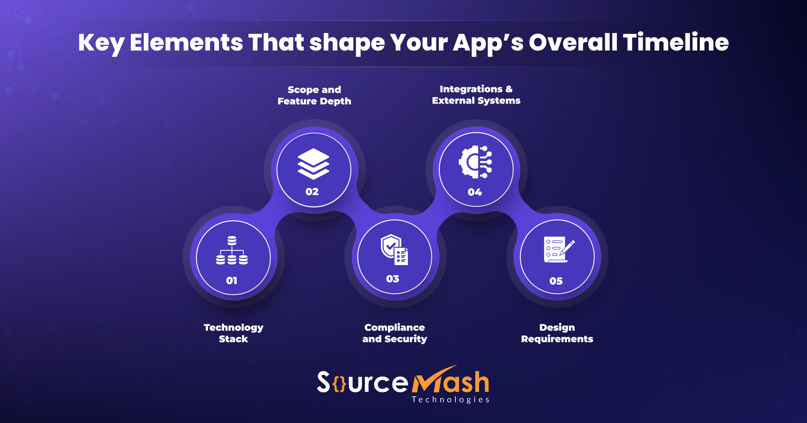
Every app progresses at its own pace, shaped by early decisions and the realities uncovered during development. Now that you understand how long app development can take, let’s explore the factors that truly impact the timeline—so you can plan confidently rather than guess.
Scope and Feature Depth
The more functionality you expect in the initial release, the longer the build will take. Simple user flows move quickly, but once you introduce layered logic, role‑based access, analytics, messaging, payment gateway integration, or automation, the timeline naturally expands. Many delays at the leadership level stem from adding “just one more feature” after development is already underway.
Design Requirements
Some teams prefer a clean, minimal interface. Others want micro‑interactions, complex animations, custom UI components, and a fully branded experience. Both approaches are valid, but they require different levels of effort. The design stage sets the foundation for development—so the more detailed and interactive the design, the more time it adds to the overall schedule.
Technology Stack
Your technology choices play a major role in determining how easy or difficult the development journey will be. Modern stacks with strong libraries, solid documentation, and active community support speed up progress. In contrast, legacy systems, outdated technologies, or rare tech stacks can slow everything down. When building across iOS, Android, and the web, the importance of choosing the right stack increases even further.
Integrations and External Systems
Every integration behaves differently. Some APIs are reliable and straightforward, while others require extensive testing due to limited documentation, slow responses, or inconsistent behavior. If your product depends on payment gateways, logistics systems, banking infrastructure, or government platforms, make room for additional time related to alignment, testing, and approvals.
Compliance and Security
Industries dealing with sensitive data have no shortcuts. Apps for finance, healthcare, or government sectors must undergo multiple layers of review. Security testing, encryption work, policy mapping, and preparing for audits all require dedicated effort. These steps strengthen your product’s protection but naturally add time to the development timeline.
Team Structure
A cohesive, experienced team can move significantly faster than scattered contributors. When design, development, QA, and product teams work in tight, efficient cycles, progress accelerates. But when communication slows down or roles overlap, delays begin to stack up, extending the overall timeline.
External Factors That Slow Down App Development

Even with a solid plan, external influences can shift delivery timelines. Some delays can be mitigated with preparation, while others depend on vendors, systems, or teams outside your control. This is why leaders still ask how long development will take even after a project is underway—because timelines can change as these external elements move.
Changing Requirements
When scope continues to evolve during development, timelines naturally extend. Minor adjustments are expected, but repeated changes to features, flows, or priorities slow down progress. Making clear decisions early helps the team stay aligned and efficient.
Delayed Third‑Party Approvals
Some functionalities depend on external parties—payment processors, banks, logistics systems, government APIs, compliance teams, or integration vendors. If their approval cycles slow down, your project timeline is affected as well. These delays are especially common in enterprise environments.
App Store Review Delays
Mobile apps never go live immediately. Apple and Google each have their own review queues, and the process can take longer if your app uses payments, location services, data capture, or other sensitive permissions. Even if development is flawless, these review cycles can still add extra time.
Unstable APIs
If your app relies on external systems that frequently break or return inconsistent data, development slows down. Engineers spend more time fixing unexpected issues rather than creating new features. Reliable APIs help keep the project on schedule.
Stakeholder Alignment
Enterprise projects often involve multiple decision-makers. When approvals take too long or teams hold different expectations, development pauses until everyone is aligned. Quick, clear decisions help maintain a steady workflow.
Legacy Systems
Integrating modern applications with older systems can take more time than anticipated. Legacy software often comes with outdated technology, limited documentation, or slow data access. These challenges usually extend the overall development timeline.
Unclear Documentation
When workflows, business rules, or data structures aren’t clearly explained, teams are forced to make assumptions. This leads to rework, delays, and quality issues. Good documentation can save significant time and prevent costly confusion.
Shifting Scope
Shifting scope goes beyond simple requirement changes. It happens when the entire product vision expands mid‑development—new modules, additional user roles, more dashboards, fresh integrations, or increased analytics needs.
Once you understand the external factors that influence development timelines, the next important insight is recognizing the rhythm between building and validating a product. Many teams assume the development cycle ends when the coding stops, but real‑world digital products don’t work that way.
Your release speed and overall quality depend on how well development and testing operate together. When both functions stay aligned, you deliver faster and encounter fewer surprises. When they fall out of sync, even technically complete code can sit idle, slowing down the project.
How Long Does It Take to Complete Development and Testing?
Project timelines often stretch because teams underestimate how closely development and testing are connected. These aren’t two isolated phases—they influence each other continuously, and the quality of one directly impacts the speed of the other.
Your product isn’t simply being “built.” Throughout every sprint, it’s being shaped, tested, refined, corrected, and prepared for real‑world users. This stage is a major factor in determining how stable and reliable your final release will be.
Two elements matter the most here: how efficiently your teams collaborate, and how quickly issues are identified and resolved. When development and QA move in harmony, you can save weeks. When they operate in silos or fall out of sync, the timeline can slip by months.
✓ Parallel vs. Sequential Development
When teams work in parallel, design, frontend, backend, and QA progress together. This reduces the overall timeline because each team helps unblock the others in real time.
Typical range:
• Parallel development, when well‑coordinated, can cut timelines by 10% to 30% compared to running tasks sequentially.
• Sequential development is slower and can easily add 3 to 6 extra weeks, depending on complexity.
✓ Regression Cycles
Every new feature affects parts of the system built earlier. Regression testing ensures that existing flows still function correctly after updates.
Typical range:
• Light apps: 1–2 weeks
• Mid‑complexity apps: 2–4 weeks
• Enterprise builds: 4–8 weeks spread across multiple sprints
✓ Load, Performance, and Stress Testing
This phase checks how the app performs under real‑world pressure—heavy traffic, real data, scaling needs, and caching behavior. Optimization happens here.
Typical range:
• Most products require 1 to 3 weeks, depending on backend complexity and expected user volume.
✓ UAT and Stakeholder Sign-offs
This is where business teams validate if the product actually matches their expectations. No matter how smooth the build is, UAT always takes time because real workflows are being tested.
Typical range:
• Business UAT usually takes 1 to 2 weeks
• Multi‑team or multi‑region UAT can stretch to 3 to 5 weeks
✓ Security and Penetration Testing
This is a must for FinTech, healthtech, SaaS, and enterprise products. The goal is to catch vulnerabilities before launch, not after users are onboard.
Typical range:
• Standard security testing takes 1 to 2 weeks
• Full penetration testing, especially for critical systems, takes 3 to 6 weeks
In most well‑run projects, development and testing together account for 60 to 80 percent of the overall timeline. A simple app may finish both in 8 to 12 weeks, while a mid‑complexity product may take 4 to 6 months, and enterprise systems often extend to 6 to 12 months or more depending on scale.
Strategies for Speeding Up App Delivery
Often, the challenge isn’t the timeline itself—it’s the approach. When teams follow the right processes and make smart engineering choices from the beginning, development naturally accelerates. Now that you understand how long app development typically takes, here are methods that help teams deliver faster without compromising quality.
|
Strategy |
What It Means in Practice |
Why It Speeds Things Up |
|
Focused discovery |
Teams clarify the core problem, map user flows, and lock requirements early. |
Reduces rework later and keeps the build steady. |
|
Reusable components |
Using pre‑built modules, design systems, templates, and existing backend blocks. |
Cuts weeks off UI and engineering time. |
|
MVP‑first mindset |
Ship the essential features first and scale the rest later. |
Eliminates unnecessary bloat and accelerates launch. |
|
Choosing the right tech stack |
Selecting tools that match your scalability, security, and integration needs. |
Avoids slow, complex rewrites and unstable builds. |
|
Microservices architecture |
Breaking your system into smaller independent components. |
Lets multiple teams work in parallel. |
|
Cross‑platform frameworks |
Building once and deploying for iOS and Android using Flutter/React Native. |
Reduces duplicate work across platforms. |
|
Design systems |
A shared library of UI rules, components, and patterns. |
Speeds up both design and frontend builds. |
|
Parallel team pods |
Dedicated pods working on backend, frontend, and QA at the same time. |
Maximizes velocity instead of waiting on handovers. |
|
Automated testing |
Running scripts to test stability after each build. |
Catches issues early so they don’t pile up. |
|
CI/CD pipelines |
Automating builds, checks, and deployments. |
Delivers updates faster and with fewer human errors. |
How To Reduce App Development Time Without Compromising Quality?
When leaders try to move faster, the usual fear is that something will crack. Maybe stability. Maybe the experience. Maybe the budget. So the goal here isn’t to sprint blindly. It’s to shave off weeks or months without damaging the heart of the product. And when someone asks how long does it take to develop an app, this part of the conversation matters more than anything because speed without control always backfires later.
Avoiding Scope Creep
Scope creep often slips in quietly—not as a major change, but as small additions that seem harmless: a new button, an extra flow, a quick conditional tweak. Multiply these by ten or twenty, and suddenly the timeline stretches without anyone realizing why. Keeping scope tight doesn’t mean rejecting new ideas; it means capturing them, parking them, and revisiting them after launch. This discipline keeps teams focused and protects the delivery schedule.
Early Design Decisions
Many delays begin at the design stage rather than in development. When screens lack clarity or the user experience keeps shifting, developers spend more time waiting than coding. Getting core journeys right early on removes most friction later. It doesn’t need to be pixel‑perfect—just stable and clear enough so engineering can move forward without guessing what the user is supposed to do next.
Clear Documentation
Documentation may seem mundane, but it eliminates days of back‑and‑forth. When teams understand what each feature should do, what edge cases look like, and what “done” actually means, the workflow becomes smooth. This reduces confusion, prevents rework, and keeps everyone aligned. Effective documentation doesn’t need to be long—often a concise explanation with examples is all that’s required.
Strong Product Ownership
High‑velocity teams share one common trait: decisive product leadership. A product owner who understands the business, knows the users, and can make quick, informed decisions removes most bottlenecks instantly. Without that clarity, developers wait, designers interpret, and QA keeps validating shifting expectations. Strong ownership keeps the loop tight and maintains momentum, especially when decisions become complex.
Dedicated Team Structure
Splitting a team across multiple projects slows progress dramatically. A fully dedicated development team — even a small one — builds momentum. They stay immersed in the product, share the same context daily, spot issues early, and adapt quickly. It’s the difference between a team that briefly “checks in” on the project and one that truly lives inside it. Dedicated teams don’t just move faster; they think faster because they aren’t constantly switching mental focus.
Rapid Prototyping
Sometimes the quickest path forward is to stop debating and build a simple working model. A rapid prototype uncovers gaps that long discussions never reveal. It aligns everyone on the product vision before a single line of production code is written. Prototypes clarify assumptions, bring alignment, and prevent large rewrites later in the build.
Lightning Sprints
Short, intense bursts of work help teams make fast progress without sacrificing quality. These aren’t long sprints or rushed deadlines. Instead, they are focused timeframes where everyone commits to a small set of outcomes and completes them without distraction. Lightning sprints work because they give teams a sense of completion and allow for frequent course corrections, rather than chasing one huge milestone that keeps shifting.
Pre‑Built Accelerators
Not every feature needs to be built from scratch. Many functions — authentication, notifications, analytics events, payment setup — follow predictable patterns. Using pre‑built modules speeds up development, reduces bugs, and lets the team focus on what makes the product truly unique. You save time without compromising quality because these components have already been tested in real-world applications.
Cost vs. Timeline: How Development Duration Shapes Your Budget
When leaders ask about timelines, they’re not only interested in when an app will launch or how long development takes under ideal conditions. They want to understand how the timeline impacts overall spending. Time directly influences cost, and this section explains how development duration affects the total budget so decision‑makers can plan confidently and avoid surprises when projects run longer than expected.
How Build Time Affects Cost
Longer development cycles almost always mean higher costs. The team — developers, designers, QA testers, project managers — stays engaged for more sprints, and every extra iteration adds to the bill. Shorter, well‑planned builds keep costs tighter because the team works with clarity and minimal rework.
Why Speeding Up Can Increase Spending
While fast timelines may look appealing, accelerating development nearly always raises costs. To meet compressed deadlines, teams must scale resources, work in parallel streams, and increase oversight. This often requires senior talent, extended work hours, and more QA bandwidth. Rushed work can also introduce issues that become expensive to fix later.
How Smart Planning Lowers Budget Burn
Strong planning keeps a project moving smoothly. With a clear scope, early design alignment, and minimal backtracking, the team avoids unnecessary cycles. This reduces overhead and keeps the development process predictable. Predictability lowers cost because you spend less time fixing avoidable issues and more time building toward the final product.
Timeline, Team Size, and Budget: How They Interact
Team size and development timelines don’t follow a simple formula. Adding more people doesn’t automatically reduce the delivery time — in fact, it can slow things down. As teams grow, communication overhead increases, coordination becomes more complex, and efficiency can drop. The key is building a team that’s just big enough to maintain momentum without introducing unnecessary friction. When the team size is aligned with the scope, timelines remain steady and budgets stay predictable.
There’s another dimension leaders often raise: the impact of AI on timelines. Once AI enters the equation, the entire development rhythm changes. The work extends far beyond screens, APIs, or user flows. It’s influenced by data quality, model selection, training cycles, and how deeply AI is integrated into the product. This kind of work doesn’t follow the same timeline patterns as traditional development, and it deserves its own considerations.
training cycles, and how tightly AI is meant to sit inside your product. This deserves its own space, because AI work doesn’t run on the same timeline rules as standard development.
How Long Does It Take to Build an AI‑Powered Application?
AI development follows a different rhythm compared to standard app projects. Instead of focusing only on features and screens, the work expands to include data preparation, model training, and continuous iteration. A chatbot, recommendation engine, or vision model all rely on learning cycles — meaning the real question isn’t just how long it takes to build, but how long it takes for the AI to perform reliably for your business.
Typical AI Components and Their Timelines
|
AI Component |
What It Normally Involves |
Estimated Timeline |
|
AI Chatbot |
Designing the bot’s flow, training it on FAQs or internal processes, shaping tone, and refining responses through feedback loops. More time is required when the bot must understand industry‑specific terminology or act as an internal assistant. |
4–10 weeks |
|
AI Recommendation Engine |
Cleaning and analyzing user behavior data, mapping patterns, and building logic that predicts what users may want next. Access to historical data accelerates the process; without it, teams rely on cold‑start strategies. |
8–14 weeks |
|
AI Models |
Defining initial rules, observing user interactions, and repeatedly refining the model to improve accuracy. Early results come quickly, but high‑quality performance takes multiple tuning cycles. |
10–20 weeks |
|
Vision AI (Image/Object Recognition) |
Preparing or labeling images, training the model to identify objects or patterns, and teaching it to interpret variations in lighting or movement. Timeline depends heavily on dataset quality. |
12–24 weeks |
|
Training Data Work |
Gathering data, cleaning messy inputs, labeling samples, or generating new examples where none exist. These steps directly influence model performance and often determine the overall project duration. |
2 weeks to several months |
App Development Timeline Checklist for Businesses
Before development begins, every leadership team should run through a quick readiness check. This simple step often determines whether the project stays on track or experiences delays due to missing inputs. Think of it as your pre‑flight list — when these pieces are in place, timelines become predictable and budgets remain controlled.
Business Readiness
This stage confirms that everyone understands the problem, target audience, and success criteria. When leaders describe the product differently, the project loses time later. Alignment on the purpose and goals ensures a smoother path forward.
Tech Readiness
Every product depends on the systems already in place. If APIs are unstable, backend teams aren’t coordinated, or infrastructure can’t support new demands, timelines quickly slip. This step is about assessing current capabilities and identifying technical gaps early.
Feature Readiness
Here, you define what must go into version one and what can wait. When features are unclear or constantly shifting, delivery dates move automatically. A solid, agreed‑upon feature list gives design and engineering teams the clarity they need to begin.
Compliance Readiness
Industries like finance, healthcare, edtech, logistics, and government often come with strict compliance requirements. Without early clarity on areas like data storage, encryption, audit trails, or user consent, teams may need to redo work later. Getting this right upfront protects both timelines and product integrity.
Launch Readiness
This final checkpoint ensures everyone knows what “launch” actually means. Is it a hard public release, a soft roll‑out, or a beta test? Are teams prepared for approvals, app store submissions, and post‑launch monitoring? When these details are sorted early, the final stretch becomes orderly rather than chaotic.
Why is Sourcemash Technologies the Right Partner for Fast, High‑Quality App Development?
Choosing the right development partner impacts not only how fast your product moves but also how much rework you avoid. Timelines vary widely based on the team—experienced teams accelerate progress, while inexperienced ones slow it down.
At Sourcemash Technologies, we combine speed with quality. Our pod‑based delivery model reduces development time by almost one‑third because each pod operates as a unified team—design, engineering, QA, and product working in parallel rather than waiting for handoffs. This eliminates idle time and keeps momentum strong throughout the project.
Our experience further strengthens delivery. With 1600+ specialists and over 3000 digital products built, we’ve covered nearly every category: marketplaces, enterprise systems, consumer apps, AI‑driven solutions, and cross‑industry platforms. This allows us to use proven playbooks, reusable components, design systems, and accelerators that save weeks without compromising quality.
A strong start is equally important. Our discovery‑led approach ensures clear scope, well‑defined workflows, and early identification of integrations, preventing timeline surprises and ensuring predictability from day one.
You can see the impact in the brands we support. Companies like Body Shop, American, KFC, Flynas, IKEA, and Domino’s needed more than development—they needed a partner who could move fast, stay aligned, and maintain top‑tier standards. That’s where we excel.
Throughout the build, our CI/CD pipelines, strict security and compliance frameworks, and zero‑rework culture ensure smooth, reliable releases. From the first sprint to final deployment, our focus remains the same: deliver a scalable, dependable product without slowing down your business.
 MOHALI - HQ
 BANGKOK
 TORONTO
 NEW YORK
 BENGALURU